Best POS Software for Boutique in India: A Complete Guide to Billing, Inventory and Barcode Labels
A practical guide for Indian boutique owners: managing garment inventory, barcode labels, stock audits, billing, employees and customer relationships, and what to check before choosing POS software.
 Jignesh KoladiyaRetail Operations Consultant
Published 18 Nov 2026 · 27 min read
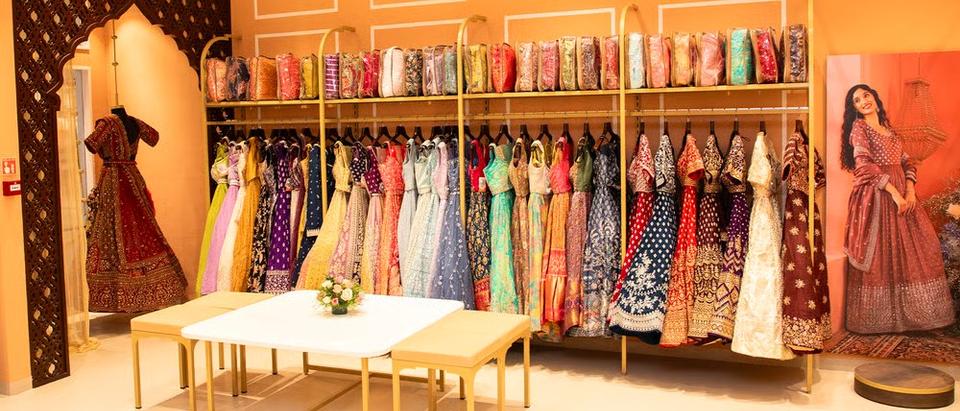
Running a boutique in India involves much more than selecting attractive garments and serving customers. Every day, boutique owners have to manage hundreds or thousands of products, different sizes and colours, new collections, purchases, billing, employees, customer enquiries, stock verification and business expenses.
A customer may ask for a particular design in a specific size. Another customer may be waiting at the billing counter. A new shipment may have arrived from a supplier, while an employee is trying to locate a garment that the inventory records show as available.
These situations are part of everyday boutique operations. When product information is maintained in notebooks, Excel sheets or disconnected applications, managing the business becomes increasingly difficult.
This is where a suitable POS software for boutiques in India can make a practical difference. The right system should do more than generate bills. It should help manage inventory, barcode labeling, purchases, stock audits, employee activity, customer records and sales reports.
This guide explains the most common operational challenges faced by Indian boutique owners, how retail POS software can address them and what to check before choosing a solution.
1. Why managing a boutique is more complicated than managing a regular retail store
A boutique often deals with a large variety of products but limited quantities of individual designs. Unlike a grocery store that may sell hundreds of units of the same product, a boutique may purchase only two or three pieces of a particular design.
The same design may be available in different sizes and colours. Some garments may be part of a seasonal collection, while others may be exclusive pieces sourced from designers or local manufacturers.
This creates several inventory management challenges:
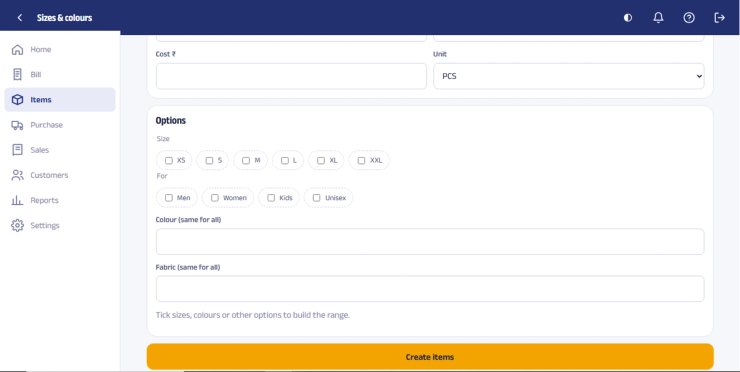
- Different sizes and colours for the same design.
- New collections arriving frequently.
- Limited quantities of individual garments.
- Products from multiple suppliers and manufacturers.
- Seasonal merchandise and changing fashion trends.
- Garments kept aside for customers.
- Products sent for alterations or customisation.
- Damaged, exchanged or returned garments.
- Stock distributed across racks, shelves and storage areas.
The owner needs to know what is available, what has sold, what is reserved and what needs attention. Relying on memory becomes difficult as the number of products and employees increases.
A suitable boutique management system should bring product, inventory and sales information together so that employees can find accurate information without repeatedly checking notebooks or asking the owner.
2. Inventory management: The biggest daily challenge for boutique owners
Inventory is often one of the largest investments in a boutique. However, keeping accurate records of every garment can be difficult.
Consider a common situation: the software shows that a particular dress is available, but the employee cannot find it. It may have been moved to another rack, given for alteration, reserved by a customer, misplaced or sold without the transaction being recorded correctly.
Common inventory problems
- Physical stock does not match the inventory records.
- Employees cannot locate products that appear available in the system.
- Similar-looking designs are confused with each other.
- Size-wise stock is not maintained accurately.
- Products given for alteration are not properly tracked.
- Reserved garments are mixed with available inventory.
- Damaged products remain included in saleable stock.
- Old collections remain unsold for several months.
- Owners cannot identify which products are selling quickly.
How POS software helps
A retail POS system should maintain item-wise inventory and update stock when purchases, sales, returns and authorised adjustments are recorded.
Employees should be able to search for products using relevant details such as:
- Product name or item code
- Barcode
- Category or brand
- Size and colour, where maintained
- Selling price
- Supplier
- Collection or season
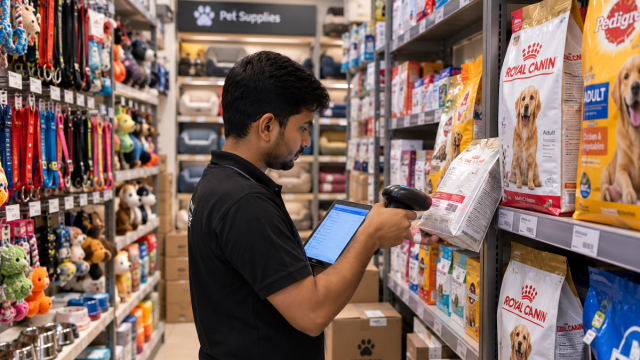
For example, if a customer asks for a black embroidered kurti in size L, the salesperson should be able to search the inventory and check whether the product is available.
3. Physical stock counting and stock audits
Physical stock verification is one of the most time-consuming tasks in a boutique. Many owners postpone stock audits because employees have to count garments individually and compare them with inventory records.
The process becomes difficult when the boutique has thousands of garments with similar designs, different sizes and multiple colours.
Why manual stock counting creates problems
- The same product may be counted more than once.
- Garments hidden behind other products may be missed.
- Similar designs may be confused.
- Employees may enter incorrect quantities.
- Stock verification may take several days.
- Discrepancies may remain unnoticed for months.
Barcode-based stock verification
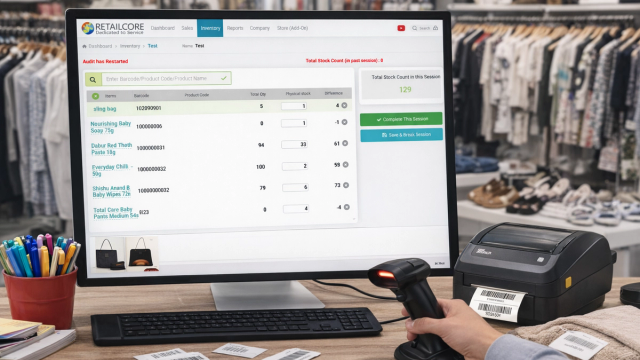
A barcode-based stock audit process can make physical verification more systematic. Each product is assigned a unique barcode linked to its inventory record.
During a stock audit, employees scan the barcode of each physical garment using a compatible scanner or supported mobile device. The scanned products can then be compared with the inventory records, depending on the stock audit functionality available in the software.
For example:
| Product | Size | Recorded Stock | Physical Stock |
|---|---|---|---|
| Floral Kurti A | S | 2 | 2 |
| Floral Kurti A | M | 3 | 2 |
| Floral Kurti A | L | 2 | 1 |
| Embroidered Dress B | M | 1 | 0 |
| Embroidered Dress B | XL | 2 | 2 |
This comparison helps the owner identify discrepancies and investigate missing or incorrectly recorded products.
What to check before buying POS software
- Does it support barcode-based physical stock verification?
- Can employees scan products during stock counting?
- Can the system identify differences between recorded and counted stock?
- Can stock adjustments be controlled through user permissions?
- Can inventory reports be exported for further analysis?
4. Barcode labeling: Managing hundreds of garment designs efficiently
Many boutiques purchase garments from local manufacturers, wholesalers, designers and wholesale markets. These products may arrive without barcodes or with supplier labels that do not match the boutique's internal product codes and selling prices.
Employees then have to search for products manually during billing. This takes time and increases the possibility of selecting the wrong product or entering an incorrect price.
Why boutiques need their own barcode system
A unique barcode gives each product a reliable identity within the boutique's inventory system. Depending on the product structure, separate barcodes can be assigned to different sizes, colours or individual pieces.
Product records may include:
- Product name and item code
- Category and brand
- Size and colour
- Purchase price and selling price
- MRP, where applicable
- Supplier information
- Collection or season
What should a garment barcode label contain?
Depending on the boutique's requirements, a garment tag may include:
- Boutique name or logo
- Product code
- Barcode
- Selling price
- Size
- Colour or short product description
Some boutiques prefer hanging tags attached to garments, while others use adhesive labels. The label design should be easy to read, scan and print. See these barcode and QR code label samples for common layouts.
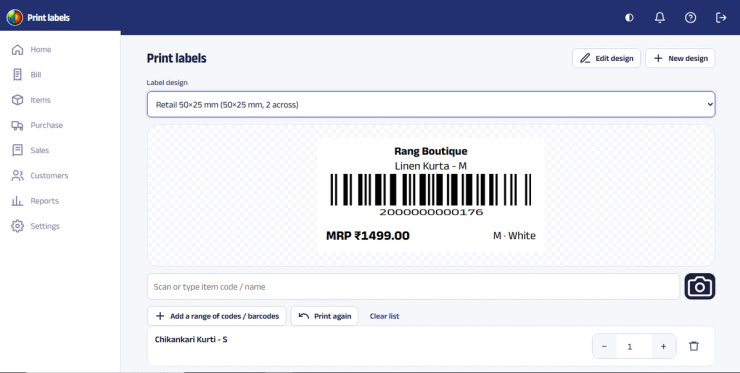
Barcode printing options
A4 sticker sheets. Suitable for printing multiple labels on a sheet using a compatible laser printer. This can be a practical option for boutiques with moderate label printing requirements.
Thermal barcode printers. Suitable for printing roll labels and individual labels in different sizes. These are useful when the boutique prints labels frequently.
Before buying a printer, check the label dimensions, printing volume, barcode type and compatibility with the POS software. A barcode that prints poorly or is difficult to scan can create problems at the billing counter.
Learn more about barcode and QR code generation and printing with RetailCore.
5. Billing errors, slow checkout and customer waiting time
Weekends, wedding seasons, festive periods and promotional events can bring a sudden increase in boutique customers.
A customer may select several garments, compare prices and try different sizes before deciding what to purchase. If employees must manually enter every product name, price and quantity, billing becomes slower.
Problems with manual billing
- Incorrect product prices
- Calculation mistakes
- Duplicate product entries
- Unauthorised discounts
- Long customer queues
- Incorrect inventory updates
- Difficulty tracking salesperson-wise transactions
How barcode-based POS billing helps
With barcode-based billing, employees scan each garment and the POS retrieves the corresponding product information. This reduces repeated manual entry and helps improve billing accuracy.
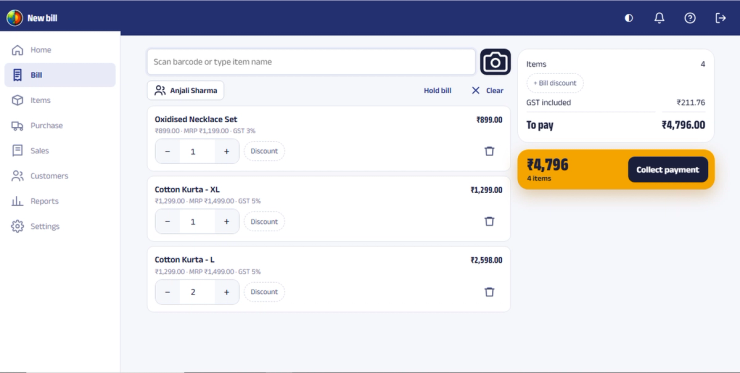
For an Indian boutique, useful billing capabilities include:
- Barcode scanning and product search
- Cash, UPI and card payment recording
- Discount handling and controls
- GST invoice generation where applicable
- Sales returns and exchanges
- Bill printing
- Digital bill sharing
- Customer and salesperson records
The aim is not simply to generate a bill faster. It is to reduce checkout delays while keeping the sales and inventory records accurate.
6. Theft, pilferage and unexplained stock shortages
Stock shrinkage is a concern for many retail businesses. In a boutique, a missing garment may go unnoticed because the store handles numerous designs and limited quantities of each item.
Stock shortages may occur because of shoplifting, employee theft, incorrect billing, unrecorded exchanges, damaged products, misplaced garments or unauthorised stock adjustments.
How POS software improves stock control
POS software cannot prevent every instance of theft. However, it can create better transaction visibility and make unusual activities easier to investigate.
Depending on the software's reporting and audit capabilities, the owner should be able to review:
- Which employee generated a bill
- Products included in a transaction
- Discounts applied
- Cancelled bills
- Sales returns
- Stock adjustments
- Physical stock discrepancies
Use employee permissions
Every employee does not need access to every software function. A salesperson may need to search products and generate bills, while a manager may require additional permissions for returns, discounts and reports.
| Activity | Salesperson | Manager | Owner |
|---|---|---|---|
| Generate bills | Yes | Yes | Yes |
| Search product stock | Yes | Yes | Yes |
| Apply discounts | Limited | Yes | Yes |
| Cancel bills | Restricted | As authorised | Yes |
| Adjust stock | Restricted | As authorised | Yes |
| View business reports | Limited | As authorised | Yes |
The exact permissions depend on the software configuration. The principle is to give employees the access they need while keeping sensitive business operations under appropriate control.
7. Staff management and employee performance
Boutique owners depend heavily on their sales employees. A salesperson may welcome customers, understand their requirements, show garments, find sizes, suggest combinations, handle billing and maintain product displays.
When the owner is present, these activities may be closely supervised. But when the owner is away, it can become difficult to understand what is happening inside the store.
Questions boutique owners often ask
- How much did each employee sell today?
- Who generated the highest sales this month?
- Which employee applied discounts?
- How many bills were generated by each salesperson?
- Are employees following the billing process?
- Which employees may need additional training?
Salesperson-wise reporting
POS software that records sales against employees can help the owner understand individual sales performance.
Useful measurements may include total sales, number of bills, average bill value, products sold and discounts applied.
These reports can help the owner recognise good performance, identify training requirements and develop fair incentive plans.
8. Customer management: Turning one-time buyers into repeat customers
Personal relationships are one of the biggest advantages of a boutique. Customers often return because they trust the owner, appreciate the styling advice or prefer the personalised shopping experience.
However, customer information maintained only in notebooks, personal phones or scattered WhatsApp conversations is difficult to manage consistently.
What customer information can a POS maintain?
- Customer name and mobile number
- Purchase history
- Previous purchases and bill details
- Total purchase value
- Frequency of visits, where available through reports
- Customer preferences, where appropriately recorded
- Birthday or anniversary information, if voluntarily provided
Why purchase history matters
Suppose a customer regularly purchases ethnic wear and prefers a particular price range or style. When she visits again, employees can use available purchase information to understand her requirements more quickly.
The boutique can also identify regular customers and communicate relevant information about new collections, subject to the customer's consent and applicable privacy requirements.
WhatsApp communication
WhatsApp is widely used by Indian retail businesses for customer communication. Boutiques may use it to share digital bills, confirm product availability, communicate about alterations or inform customers about new collections.
Communication should be relevant and respectful. Sending excessive promotional messages can weaken customer relationships rather than strengthen them.
9. Increasing average bill value through better product recommendations
A customer visiting a boutique to purchase one dress may also be interested in matching accessories, a dupatta, jewellery, footwear or another complementary garment.
However, employees may not always remember which complementary products are available, especially when the store has a large inventory.
Use sales information to identify opportunities
Boutique owners should regularly review:
- Average bill value
- Average number of products per bill
- Best-selling categories
- Product-wise sales
- Frequently purchased products
- Sales by employee
- Discounts and promotional performance
For example, a boutique may create coordinated combinations such as a kurti with leggings, a saree with a blouse or a festive outfit with matching accessories.
The objective is not to pressure customers into buying more. It is to help them discover suitable products that complement their original purchase.
10. Dead stock and slow-moving collections: Money blocked in unsold garments
Fashion retail is sensitive to changing trends and seasons. A design that sells quickly today may become difficult to sell after a few months.
When too much money is invested in slow-moving garments, the boutique has less working capital available for new collections and other business expenses.
Why dead stock accumulates
- Buying too many pieces of one design.
- Purchasing an unsuitable size mix.
- Misjudging customer preferences.
- Buying seasonal products at the wrong time.
- Purchasing based on appearance rather than demand.
- Not reviewing previous sales before placing new orders.
Use stock and sales reports to make better decisions
A suitable POS should provide reports that help identify products requiring attention, such as product-wise sales, stock ageing, category-wise sales and current inventory.
| Product | Purchased | Sold | Remaining | Possible Action |
|---|---|---|---|---|
| Floral Kurti | 20 | 18 | 2 | Review replenishment |
| Party Dress | 10 | 3 | 7 | Review demand and pricing |
| Winter Jacket | 15 | 2 | 13 | Review seasonality |
| Cotton Dress | 12 | 11 | 1 | Consider replenishment |
The figures above are illustrative examples, not actual boutique sales data.
Before visiting a wholesale market, the owner can review which designs and sizes sold quickly, what is still available and how much capital is tied up in similar merchandise.
11. Purchase and supplier management
Boutique owners may purchase merchandise from several wholesalers, manufacturers, designers and local suppliers. Recording these purchases accurately is essential for maintaining reliable stock and cost information.
Common purchase management problems
- Purchase quantities are entered incorrectly.
- Supplier invoices are difficult to reconcile.
- New stock is not entered immediately.
- Duplicate product records are created.
- Purchase prices change but records are not updated.
- Supplier payment information is scattered.
- Owners cannot easily compare supplier purchases with sales.
What purchase management software should provide
The system should allow the boutique to record supplier details, purchase invoice numbers, purchase dates, products, quantities, costs, applicable taxes, discounts and payment information.
Purchase entries should update inventory according to the software's workflow. This helps the owner understand what has arrived, how much it cost and what remains available for sale.
Supplier-wise records can also help the owner review which suppliers provide products that sell well, offer suitable margins and meet the boutique's quality expectations.
12. Exchanges, returns, alterations and customer reservations
Boutique operations often continue after the customer has completed a purchase. Customers may request size exchanges, returns according to store policy, alterations, customisation or product reservations.
When these activities are managed through handwritten notes or scattered messages, employees may forget important details.
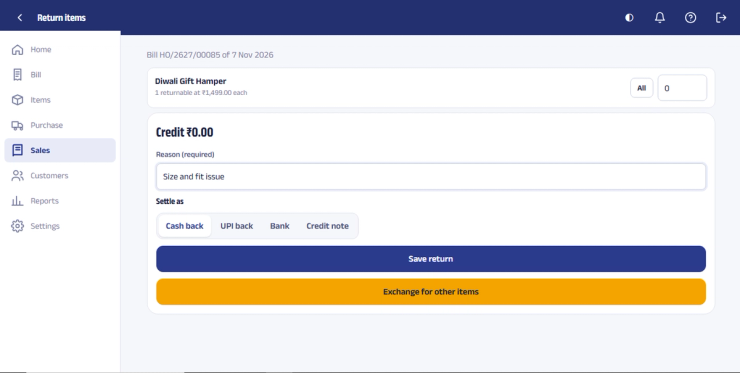
Example: An alteration request
A customer purchases a dress and requests an alteration. The garment is handed to a tailor, but nobody records the expected completion date. A few days later, the customer calls to ask whether the garment is ready.
The owner now has to search through messages, call the tailor and ask employees for an update.
Create a clear process
- Record the customer and purchased garment.
- Note the alteration or service requirement.
- Record the expected completion date.
- Assign responsibility to the appropriate employee.
- Track the work status.
- Inform the customer when the garment is ready.
- Record the final delivery.
Not every POS system includes a dedicated tailoring or alteration management module. Boutique owners should specifically check whether the software supports their workflow or whether a separate process is required.
Customer reservations should also be handled systematically. A reserved garment should be distinguishable from stock that is freely available for sale.
13. Multiple billing counters and boutique expansion
A boutique may initially operate with one billing counter. As the business grows, the owner may introduce additional employees, billing computers, sections or branches.
During busy periods, a second billing counter can help reduce queues. However, multiple counters need reliable access to the correct inventory and sales information.
What to check in multi-counter POS software
- Multiple billing computers or counters
- Shared or synchronised inventory, as applicable
- Counter-wise sales reports
- Employee-wise transaction records
- User permissions
- Centralised business reporting
If the boutique operates multiple branches, the requirements become more extensive. The owner may need branch-wise inventory, central purchasing, stock transfers, store-wise sales and consolidated reporting.
Choose software that fits the current business while allowing for realistic future expansion.
14. Sales reports: Make business decisions using actual data
Knowing the day's total sales is useful, but it does not tell the owner everything about business performance.
A boutique owner should also understand which products sold, which categories performed well, how much discount was given and which inventory is moving slowly.
Useful reports for boutique owners
| Report | Business Use |
|---|---|
| Daily sales | Monitor daily business performance |
| Monthly sales | Understand growth and seasonal trends |
| Product-wise sales | Identify popular designs |
| Category-wise sales | Understand demand across categories |
| Salesperson-wise sales | Review employee contribution |
| Discount report | Monitor discounting practices |
| Purchase report | Track buying activity |
| Stock report | Review current inventory |
| Stock ageing | Identify slow-moving products |
| Customer purchase report | Understand repeat purchases |
| Payment report | Reconcile payment collections |
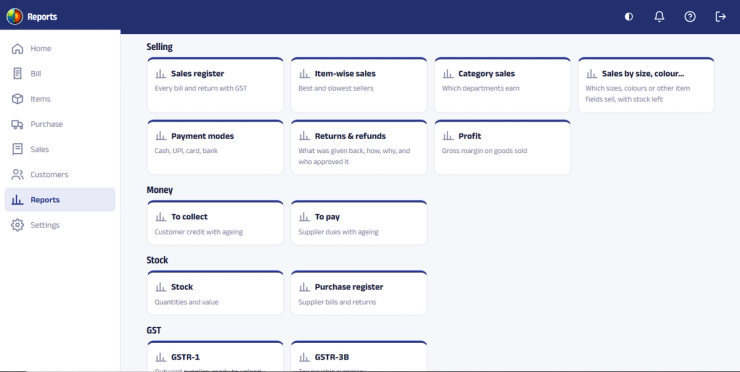
Profitability reports should be interpreted carefully. Their accuracy depends on correct purchase costs, expenses, discounts, taxes and other relevant data being recorded.
15. Customer service: The difference between a transaction and a relationship
A boutique's competitive advantage is often its customer service. Customers may choose a local boutique because they trust the owner, appreciate the styling advice, enjoy the shopping experience or receive personalised attention.
Large online marketplaces may compete on convenience and discounts. A boutique can differentiate itself through personal service, product knowledge, fitting assistance, recommendations and an understanding of customer preferences.
Common customer service problems
- Staff do not know whether a product is available.
- Employees cannot locate the correct size.
- Customers wait too long for billing.
- Purchase history is unavailable when needed.
- Enquiries are not followed up.
- Reserved products are not communicated properly.
- Exchanges and complaints are handled inconsistently.
How technology supports better service
A POS system should help employees quickly access product information, stock availability, customer records and billing details.
Technology should not replace personal interaction. It should reduce administrative work so that employees can spend more time helping customers and less time searching notebooks, spreadsheets and old bills.
16. Mobile billing: Flexibility beyond the billing counter
Boutique sales do not always happen at a traditional billing counter. Some businesses participate in fashion exhibitions, wedding exhibitions, pop-up events and temporary stalls.
Mobile billing can be useful in these situations, allowing authorised staff to generate bills using a compatible smartphone and supported application.
Possible mobile billing activities
- Search products.
- Scan barcodes using the phone camera, where supported.
- Add products to a bill.
- Generate invoices.
- Record transactions.
- Share digital bills, where supported.
Before choosing mobile billing, check whether it works with your POS configuration, whether internet connectivity is required, how transactions update inventory and whether the required licence is included.
17. Cloud POS versus desktop POS: Which is better for a boutique in India?
Boutique owners often have to decide between cloud-based software and desktop software. Neither option is automatically better for every business.
Cloud-based POS software
Cloud software generally uses online infrastructure and requires an internet connection for normal operation.
- Can provide access to business information from supported devices and locations.
- Can be suitable for owners who need remote visibility.
- Can support centralised operations across multiple locations.
- May support connected applications and mobile billing.
Consider internet reliability, subscription costs, data security, backup arrangements and the vendor's service reliability.
Desktop POS software
Desktop software is installed on a computer or local infrastructure. Software designed for offline operation may continue working without an internet connection.
- Can suit businesses that prefer local operation.
- Can support offline billing if designed for it.
- May be suitable for stores with a stable local setup.
- Requires proper backup and hardware maintenance.
Remote access and multi-computer configuration may require additional planning.
18. GST billing and financial control
Boutique owners in India may need to manage GST invoices, purchase records, product tax information and payment reconciliation, depending on their registration and applicable requirements.
Before selecting POS software, check whether it supports the billing and tax configuration relevant to your business.
- GST invoice generation where applicable
- Tax calculations and product tax settings
- HSN information, where required
- Discounts and sales returns
- Purchase records
- Payment recording
- Sales and transaction reports
Correct configuration and accurate data entry are essential. POS software does not replace professional tax advice or guarantee compliance if the business uses incorrect tax information.
To check that a customer's or supplier's GST number is in the correct format before you save it, use the free GSTIN checker.
19. What features should you look for in the best POS software for a boutique?
Do not select a system based only on its billing demonstration. A growing boutique needs software that supports the wider retail operation.
| Feature | Why It Matters |
|---|---|
| Fast POS billing | Reduces customer waiting time |
| Barcode generation | Gives products a unique identity |
| Barcode label printing | Simplifies garment tagging |
| Size and colour identification | Helps manage product variations |
| Inventory management | Tracks available stock |
| Physical stock audit | Helps identify discrepancies |
| Purchase management | Records incoming merchandise |
| Supplier records | Maintains supplier information |
| Stock ageing reports | Identifies slow-moving inventory |
| Sales reports | Measures business performance |
| Customer management | Supports repeat business |
| Employee permissions | Controls access to important operations |
| Discount controls | Helps monitor discounting |
| Returns and exchanges | Supports after-sales operations |
| Multiple counters | Supports busy stores |
| Mobile billing | Supports exhibitions and flexible billing |
| Digital bill sharing | Offers convenient customer receipts |
| GST billing | Supports applicable tax requirements |
| Backup facilities | Helps protect business information |
| Multi-store management | Supports business expansion |
| Training and support | Helps employees use the system correctly |
The important point is integration. Billing, inventory, barcode printing, purchases and reports should work together. Otherwise, the owner may still have to manage separate databases and reconcile information manually.
20. Ten questions to ask before buying boutique POS software
1. Can I create a unique barcode for every garment?
Ask how the system identifies different designs, sizes, colours and individual pieces.
2. Can I design and print custom barcode labels?
Ask to see the actual label designer. Check label dimensions, barcode formats and printer compatibility.
3. Can I perform physical stock audits using barcode scanners?
Ask the vendor to demonstrate the complete stock verification process, not just barcode scanning during billing.
4. Can employees quickly check product availability?
Test product search using item code, barcode, size, colour and category, where supported.
5. Can I see which employee generated a bill?
Employee-wise transaction records are useful for accountability and performance reviews.
6. Can I control discounts, cancellations and stock adjustments?
Check whether different permissions can be assigned to salespeople, managers and owners.
7. Can I manage purchases and suppliers?
Purchase records should connect with inventory so that incoming merchandise is recorded correctly.
8. Can I identify slow-moving inventory?
Ask for a demonstration of stock ageing, product-wise sales and inventory reports.
9. Can I maintain customer purchase history?
Customer records can help employees provide more relevant service and understand repeat purchases.
10. What support is available after installation?
Ask about product setup, barcode configuration, bill formats, printer configuration, employee training, backups, software updates and ongoing support charges.
21. How RetailCore helps boutiques manage daily retail operations
RetailCore is a retail billing and inventory management software solution designed to help retail businesses manage sales, products, inventory, purchases, customers, barcodes and business reporting.
For a boutique, the objective is to bring important daily retail activities into an organised system instead of depending on disconnected manual processes.
Inventory and product management
RetailCore helps maintain product records and manage stock quantities. Products can be organised according to the boutique's inventory structure, making it easier for employees to search and identify merchandise during billing and stock management.
Barcode generation and printing
RetailCore supports barcode generation and barcode label printing. Boutiques can create labels according to their product identification and tagging requirements.
Custom label designs can help include relevant information such as product codes, prices, sizes and other details, depending on the selected label format.
Fast barcode-based billing
Products can be scanned using compatible barcode scanners to retrieve their details during billing. This helps reduce manual product entry and supports more organised checkout operations.
Purchase and stock management
RetailCore helps record purchases and maintain inventory information, allowing boutique owners to track merchandise entering and leaving the business through recorded transactions.
Sales and inventory reports
Sales and inventory reports can help owners review business performance, understand product movement and identify stock that requires attention.
Customer management
Customer records and purchase information can help boutiques understand buying patterns and provide more personalised service.
Mobile billing
RetailCore's mobile billing solution supports billing through compatible Android phones using its cloud configuration. The phone camera can be used for barcode scanning, allowing billing away from the conventional computer counter in suitable operating situations.
Learn more about RetailCore mobile billing.
Single-store and multi-store solutions
RetailCore offers different solutions according to the operating structure of a retail business:
- RC One: Designed for single-store retail management.
- RC Multi: Designed for businesses managing multiple stores, branches or other multi-location retail operations.
The appropriate configuration depends on the number of locations, counters and operational requirements.
Hardware guidance
RetailCore provides guidance on compatible hardware, configuration and setup requirements. Boutique owners can evaluate suitable computers, bill printers, barcode scanners and barcode label printers according to their requirements.
Hardware compatibility should be confirmed before purchasing new equipment. Read the RetailCore hardware guide.
Installation, training and support
Implementing retail software involves more than installing an application. Product data, barcode configuration, bill formats, hardware setup and employee training are important parts of the process.
RetailCore assists customers with software setup and training according to the applicable implementation and support arrangements.
Looking for POS software for your boutique?
Discuss your boutique's requirements for inventory management, barcode labeling, billing, stock audits and employee operations with the RetailCore team.
22. Frequently asked questions about boutique POS software in India
Which is the best POS software for a boutique in India?
The best POS software depends on the boutique's size, inventory complexity, number of employees, billing counters, barcode requirements and budget. Look for integrated billing, inventory, barcode printing, stock audits, purchase management, customer records, employee controls and useful business reports.
Is POS software useful for a small boutique?
Yes. Even a small boutique can benefit from accurate stock records, faster billing, barcode identification and sales reports. The value depends on the number of products and the complexity of daily operations, not just the store's size.
Can boutique software manage different sizes and colours?
Many retail systems support product variations. Before buying, confirm how size and colour combinations are entered, identified, searched, billed and reported. Ask the vendor to demonstrate the exact workflow using your type of garments.
Is barcode labeling necessary for a boutique?
Barcode labeling is not compulsory for every boutique, but it can improve billing accuracy, inventory management and stock verification, particularly when the store has many designs and product variations.
Can I print my own garment barcode labels?
Yes. With suitable barcode software and a compatible printer, boutiques can generate and print labels according to their requirements. Check whether the software supports the label size and layout you need.
Which printer is suitable for boutique barcode labels?
A compatible thermal barcode label printer is generally suitable for roll labels. A compatible laser printer can be used for barcode labels on A4 sticker sheets. The choice depends on label size, printing volume and tagging requirements.
Can I use a barcode scanner for physical stock counting?
A barcode-based stock audit system can help employees scan products during physical stock verification. Confirm whether your POS supports stock audit functionality and the scanners or mobile devices you intend to use.
Can POS software help reduce theft in a boutique?
POS software can improve transaction visibility, employee accountability and control over discounts, returns and stock adjustments. It can also help identify stock discrepancies. However, software alone cannot prevent theft; physical security and appropriate store procedures are also necessary.
Can I track salesperson-wise sales?
Retail POS systems may provide employee-wise sales reports. These can help boutique owners review sales performance, identify training needs and develop suitable incentive structures.
Can I maintain customer purchase history?
Customer management functionality can help maintain customer information and purchase history. This can support more personalised service and help the boutique understand repeat purchases.
Can I send bills through WhatsApp?
Depending on the software configuration, digital bills can be shared through WhatsApp, making it convenient for customers to retain their purchase records.
Can POS software manage garment alterations and reservations?
This depends on the software's workflow capabilities. Before purchasing, demonstrate how alteration requests, reserved garments, expected delivery dates and pending customer requirements will be recorded and tracked. Some boutiques may need a separate process for these activities.
Can I operate multiple billing counters in one boutique?
Many retail POS solutions support multiple billing computers or counters. Confirm licensing, configuration, networking and inventory synchronisation requirements with the vendor.
Can I manage more than one boutique branch?
A multi-store retail system can help manage branch-wise inventory, sales, transfers and reporting. Confirm that the software supports your required branch management workflow.
Does boutique POS software work without internet?
This depends on the software configuration. Desktop software designed for offline operation may continue working without internet connectivity, while cloud-based POS software generally requires an internet connection.
Is cloud POS better than desktop POS?
Neither is universally better. Cloud POS may be more suitable for remote access and connected operations, while desktop POS may suit businesses that prioritise local operation and offline billing. Evaluate your internet reliability and operational requirements before deciding.
Can POS software help identify dead stock?
Reports such as product-wise sales, stock ageing and inventory reports can help identify products that are selling slowly and require purchasing, pricing or promotional decisions.
How much does boutique POS software cost in India?
Pricing varies according to features, cloud or desktop configuration, number of billing counters, number of stores, integrations and support requirements. Compare the total cost of ownership rather than only the initial software price.
How long does it take to implement boutique POS software?
Implementation time depends on the number of products, existing inventory data, barcode requirements, hardware configuration and employee training. A boutique with clean product data may be easier to set up than one with thousands of products requiring manual identification and data entry.
Conclusion: Choose a POS system that solves your boutique's daily problems
A boutique's success depends on product selection, customer experience, pricing, fashion trends, location, service quality and business management.
But as the business grows, managing these activities without proper systems becomes increasingly difficult.
The right POS software can help boutique owners maintain accurate stock records, simplify barcode labeling, conduct physical stock audits, reduce billing errors, manage purchases, monitor employee activity, understand customer buying patterns and make better purchasing decisions.
Do not select software merely because it offers billing at a low price. Evaluate how well it supports the complete daily operation of your boutique, from the arrival of new merchandise to the final sale.
For boutique owners in India looking to organise billing, inventory, barcode labeling, purchases and retail operations, RetailCore offers retail management solutions designed to bring these activities together in one system.
Start by identifying your current operational challenges. Then ask the software provider to demonstrate how the system addresses those specific requirements.
Explore RetailCore for your boutique
Have questions about boutique billing, garment barcodes, inventory management or stock audits? Contact RetailCore to discuss your requirements.
Related RetailCore resources
- RetailCore retail billing and inventory software
- RetailCore boutique software
- Fashion and clothing retail software
- AuditCore physical stock audit software
- Barcode and QR code generation and printing
- RetailCore mobile billing
- RetailCore hardware guide

Jignesh Koladiya
Retail Operations Consultant
At RetailCore we analyse challanges faced by retailers and we design, build, take feedback and support retail and wholesale businesses across India and beyond.