Best POS for Imitation Jewellery Shop in India: Billing, Barcode, Inventory & Stock Control
A practical guide to choosing POS software for an imitation jewellery shop, covering billing, barcode labels, inventory, smartphone stock audits, staff monitoring, customer management and promotions.
 Jignesh KoladiyaRetail Operations Consultant
Published 22 Nov 2026 · 23 min read
Running an imitation jewellery shop is not just about displaying beautiful products and generating bills. A retailer may manage hundreds or thousands of designs, similar-looking products, different price points, seasonal collections, multiple suppliers, customer preferences and frequent stock movement.
As the business grows, maintaining accurate inventory, locating products quickly, controlling billing activities, monitoring staff, managing customer relationships and conducting physical stock audits can become increasingly difficult.
The best POS for an imitation jewellery shop should do much more than generate invoices. It should help retailers organise products, manage inventory, print barcode labels, simplify billing, monitor stock differences, control staff activities and encourage customers to return.
RetailCore is a retail billing, inventory and business management software that brings several of these daily retail operations together. From managing thousands of items and barcode labels to smartphone-based stock audits, staff monitoring, customer management and promotional campaigns, RetailCore helps imitation jewellery retailers organise their business operations more efficiently.
Quick answer: what an imitation jewellery shop needs, and what RetailCore offers
| What an imitation jewellery retailer needs | RetailCore |
|---|---|
| Manage thousands of designs | Bulk product upload and customizable attributes |
| Identify similar products | Barcode and QR-based identification |
| Print product labels | Custom label design and printing |
| Check actual stock | AuditCore smartphone stock audit |
| Identify discrepancies early | Daily Quick Count |
| Monitor staff transactions | Watch List, alerts and activity records |
| Manage customer relationships | Purchase history, loyalty and customer information |
| Encourage repeat purchases | Offers, coupons, vouchers and occasion-based engagement |
| Collect customer feedback | Feedback QR and Google review workflow |
| Sell outside the shop | Smartphone-based cloud billing |
| Expand to branches | Multi-store management |
What should the best POS for an imitation jewellery shop offer?
- Fast and easy billing
- Management of thousands of product designs
- Customizable product attributes
- Barcode and QR code generation and printing
- Reliable inventory and stock movement records
- Smartphone-based physical stock audit
- Daily quick stock counting for loss-control monitoring
- Staff accountability and transaction monitoring
- Customer purchase history and loyalty management
- Offers, coupons, gift vouchers and promotional tools
- Customer feedback and Google review support
- Mobile billing and multi-store management where required
Why Imitation Jewellery Shops Need Specialized Retail Management
Imitation jewellery retail is different from many other retail categories. A shop may stock earrings, necklaces, bangles, rings, bracelets, pendant sets, hair accessories, bridal sets and hundreds of new designs throughout the year.
Many products may look similar at first glance but have different prices, colours, sizes, materials, designs or collections. Finding a particular design quickly becomes difficult when products are not properly organised.
The challenges increase when several employees handle billing, stock, returns, display products and customer enquiries. Without a reliable software system, retailers often depend on memory, handwritten notes, spreadsheets and manual stock checking.
Common problems faced by imitation jewellery retailers include:
- Difficulty managing thousands of designs and product variations.
- Staff taking too much time to locate products.
- Inventory records not matching physical stock.
- Products getting misplaced or going unaccounted for.
- Difficulty identifying stock shortages early.
- Discounts, bill cancellations and returns not being monitored effectively.
- Limited visibility into staff activities when the owner is away.
- Customer details and purchase history not being organised.
- Difficulty encouraging customers to return for new collections.
- Manual promotional campaigns and customer follow-ups.
A retail POS and inventory system should address these operational problems instead of merely replacing a traditional billing machine.
1. Manage Thousands of Jewellery Designs Without Losing Control
Imitation jewellery stores often carry hundreds or thousands of designs. As collections expand, manually maintaining product details, prices and stock quantities becomes increasingly difficult.
RetailCore can handle thousands of items, supports bulk product upload and provides reports to help retailers manage their product catalogue and inventory. Retailers do not need to enter every product individually when adding large quantities of products. In RetailCore One, a purchase bill can be uploaded from an Excel sheet instead of being typed line by line.
The software supports customizable product attributes, allowing retailers to organise their products according to the information relevant to their own business.
Depending on the retailer's requirements, product information can be structured around attributes such as design number, colour, material, size, collection, supplier, category or other custom details.
This flexibility is useful because every imitation jewellery retailer may have a different way of managing products. A retailer specialising in bridal jewellery may organise products differently from a shop focusing on daily wear earrings, oxidised jewellery or fashion accessories.
Instead of forcing retailers into a rigid product structure, customizable attributes allow them to organise inventory according to their own requirements.
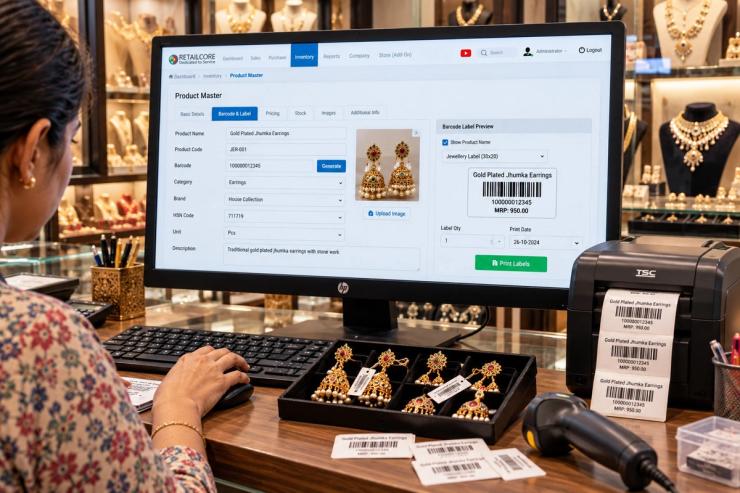
Benefits of organised product management
- Bulk upload thousands of products.
- Maintain product details in an organised catalogue.
- Customise product attributes according to business needs.
- Generate barcode labels for individual products.
- Retrieve product information more efficiently.
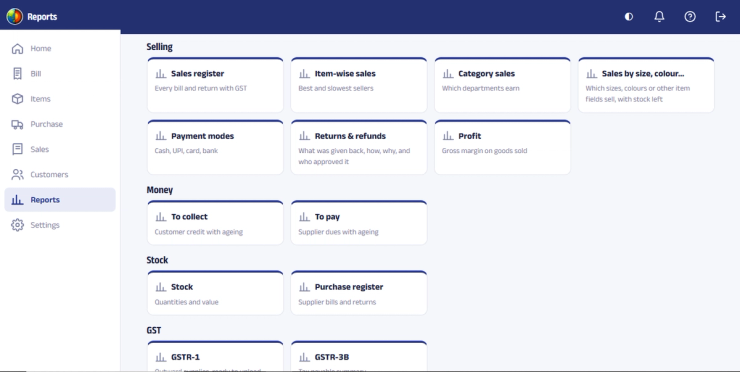
- Generate inventory and sales reports.
- Maintain better visibility of product quantities.
Whether a shop stocks 500 products or several thousand designs, a structured product catalogue makes daily billing, stock management and product identification easier.
2. Barcode Billing for Faster Sales and Better Product Identification
When a customer selects several jewellery products, staff should not have to manually search for every product name, price or stock entry. This is particularly difficult when products look similar.
Barcode-based billing simplifies product identification. Once a barcode is assigned to a product and printed on its label, staff can scan the barcode during billing to retrieve the corresponding product information.
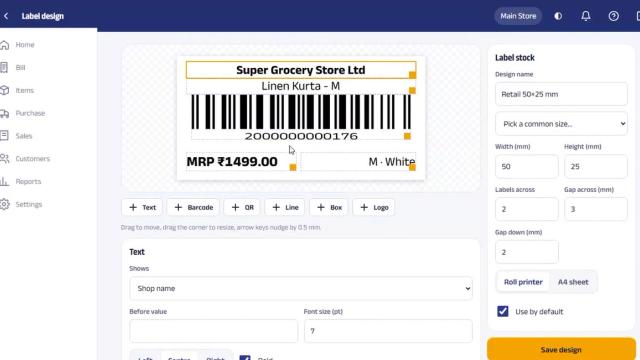
RetailCore supports barcode generation, QR code generation and barcode label design and printing.
Retailers can create labels suitable for their products and packaging requirements. Barcode labels can help distinguish similar designs, reduce product selection errors and make billing more efficient.
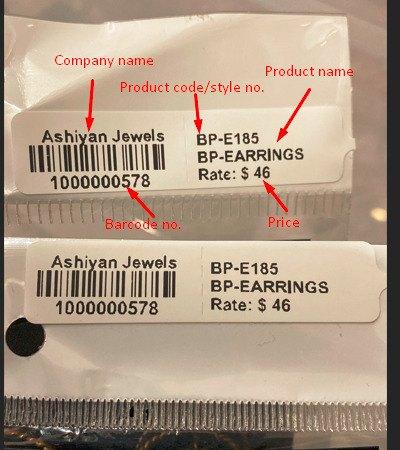
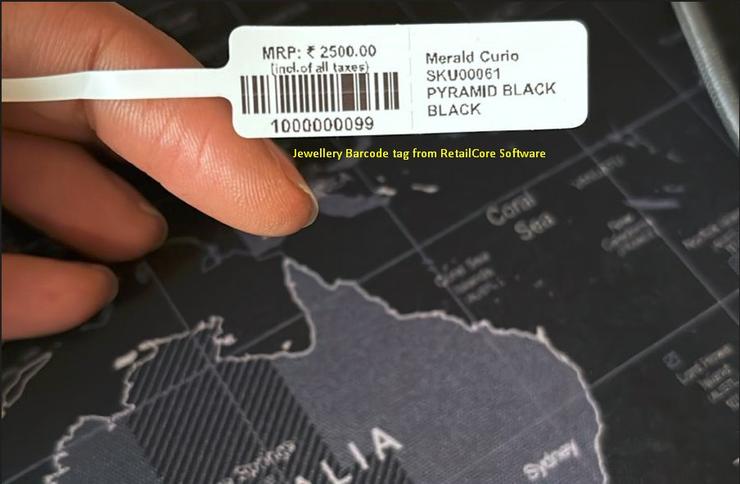
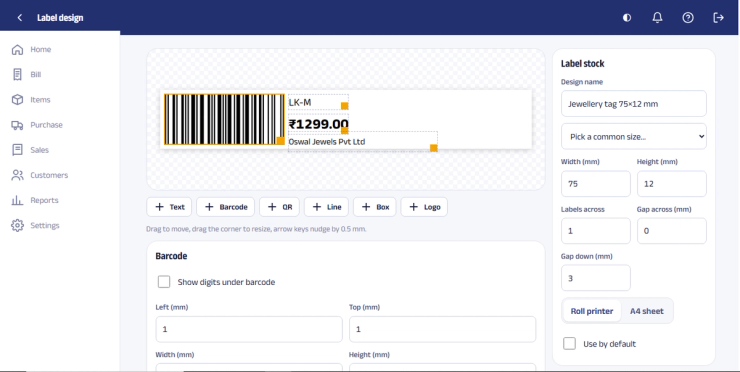
Barcode label printing options
Retailers can use compatible printing arrangements depending on their label requirements and existing hardware.
- A4 sticker sheets: Print barcode labels using compatible A4 sticker paper and laser printers.
- Roll labels: Use compatible thermal label printers for roll-based label printing.
- Custom label design: Design labels according to the store's product and printing requirements.
- Bulk label printing: Generate and print labels for large product batches.
Retailers do not necessarily need to invest in expensive specialised equipment to begin barcode-based inventory management. The appropriate printer and label setup can be selected according to the store's requirements and compatibility. See the printers and scanners that work with RetailCore.
For an imitation jewellery shop handling hundreds of new designs, barcode labels can improve product identification, simplify billing and make stock verification more practical.
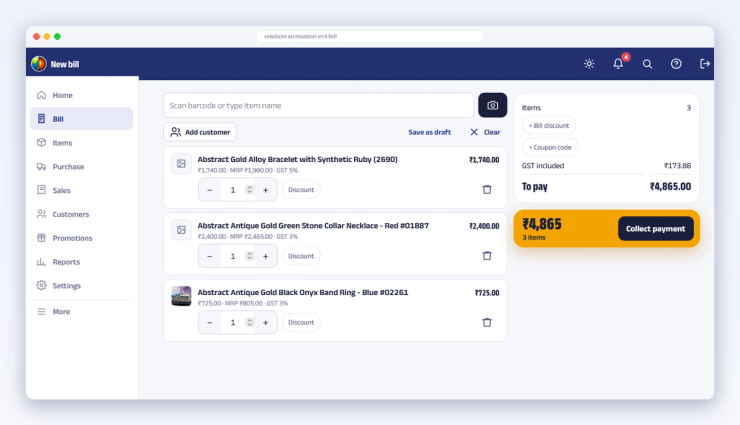
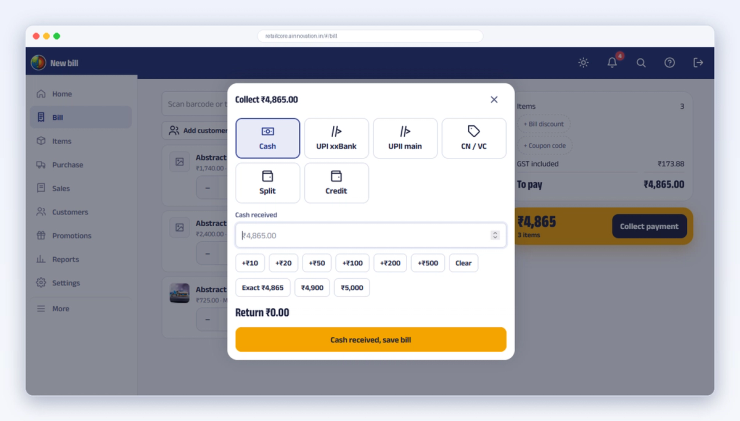
Learn more about RetailCore's barcode and QR code generation and printing: Barcode & QR Code Generation and Printing. You can also see real barcode and QR code label samples and read our barcode inventory management guide.
3. Smartphone-Based Physical Stock Audit with AuditCore
One of the biggest challenges in imitation jewellery retail is verifying whether the stock recorded in the software matches the stock physically available in the store.
Manually counting thousands of products, writing quantities on paper and entering the figures into a computer later is time-consuming. It can also introduce errors during counting or data entry.
RetailCore addresses this through its smartphone-based stock audit system, AuditCore.
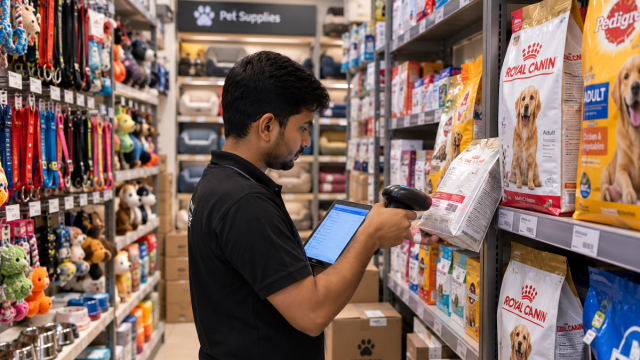
AuditCore allows physical stock counting to be performed using smartphones. Staff can scan product barcodes while counting products in the shop, stockroom or other inventory locations.
The stock audit process can be divided among multiple people. The collected audit data is consolidated through the AuditCore engine, which helps retailers compare physical stock against recorded inventory and identify differences.
How AuditCore stock auditing works
- Prepare the inventory data for the stock audit.
- Staff use smartphones to scan product barcodes while physically counting products.
- Multiple employees can participate in counting different sections of the store.
- The collected counting data is consolidated by the AuditCore engine.
- The stock audit report identifies stock differences for further review.
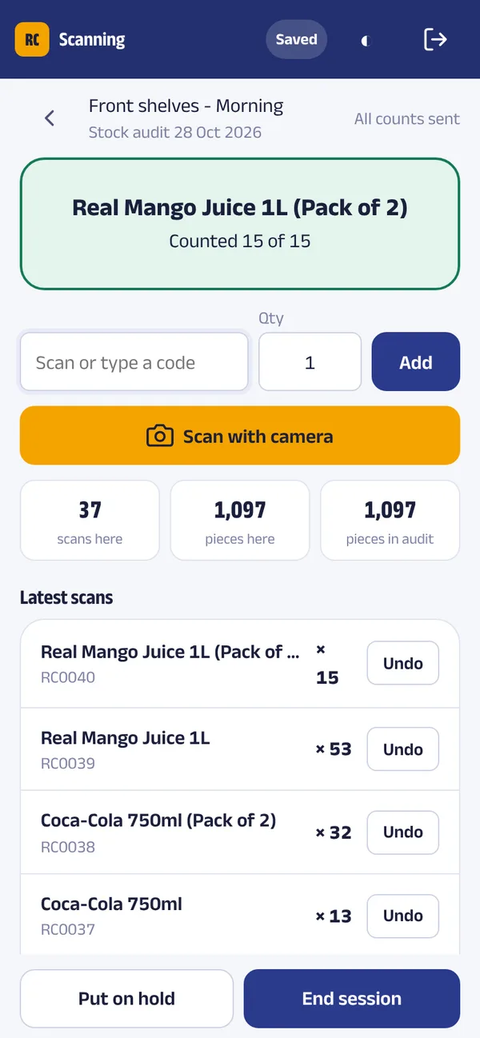
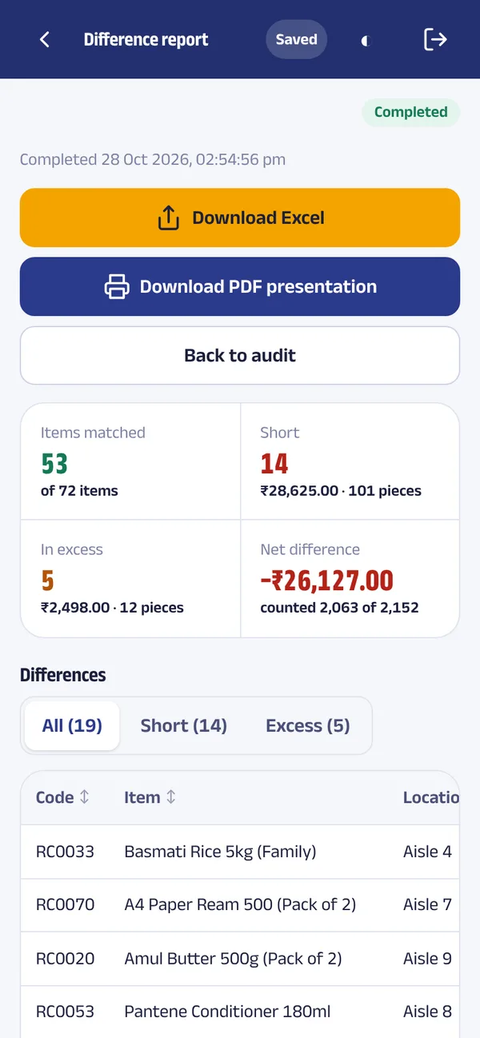
The consolidated audit results help retailers identify matched quantities, shortages and excess stock. Reports can be used to investigate discrepancies and take appropriate corrective action.
The process is particularly useful for imitation jewellery retailers dealing with a large number of small products, where counting manually and comparing stock records can become a major task.
Instead of depending on handwritten stock lists, retailers can use smartphones already available to their staff to conduct a barcode-based stock audit.
Read more about: AuditCore Smartphone-Based Stock Audit Software.
4. Daily Quick Stock Count to Identify Discrepancies Earlier
Retailers do not always need to wait for a complete physical stock audit to discover inventory differences. In imitation jewellery stores, certain products may require more frequent checking because they are small, fast-moving, expensive or handled by several employees.
RetailCore supports a Quick Count approach, where a few selected products can be counted periodically, such as every day, rather than conducting a complete inventory audit each time.
Retailers can check selected items, compare physical quantities with recorded stock and investigate differences when they are discovered.
Why quick stock counting matters
- Check selected products regularly.
- Identify inventory discrepancies sooner.
- Focus on sensitive, high-value or fast-moving items.
- Investigate shortages while transaction details are more recent.
- Develop a regular stock-checking discipline.
- Monitor stock-count activity and missed counting days.
For example, a retailer may decide to count 20 selected designs every day. The selection can focus on expensive products, fast-moving designs or items that the owner wants to monitor more closely.
If the physical quantity does not match the software quantity, the retailer can investigate possible reasons such as billing errors, returns, misplaced products, stock transfers or other discrepancies.
Quick Count and AuditCore serve different purposes. Quick Count supports frequent, smaller inventory checks, while AuditCore supports broader physical stock verification.
5. Staff Accountability, Monitoring and Theft Control
Managing staff is an important part of running an imitation jewellery shop. Employees may handle products, discounts, bill cancellations, returns, price changes and customer transactions throughout the day.
When the owner is not always present at the counter, it becomes difficult to personally monitor every activity. The objective of retail software should be to make transactions accountable, reduce opportunities for unauthorised activity and help the owner identify unusual patterns.
RetailCore includes staff permissions, transaction monitoring, alerts and a Staff Watch List that compares employee activity against the rest of the shop.
What can RetailCore help retailers monitor?
- Bill clearing activity.
- Items removed from bills.
- Returns and cancelled bills.
- Discounts given by staff.
- Cash given back.
- Billing outside configured shop hours.
- Price changes.
- Bills not sent to customers.
- Offers used.
- Other unusual transaction patterns.
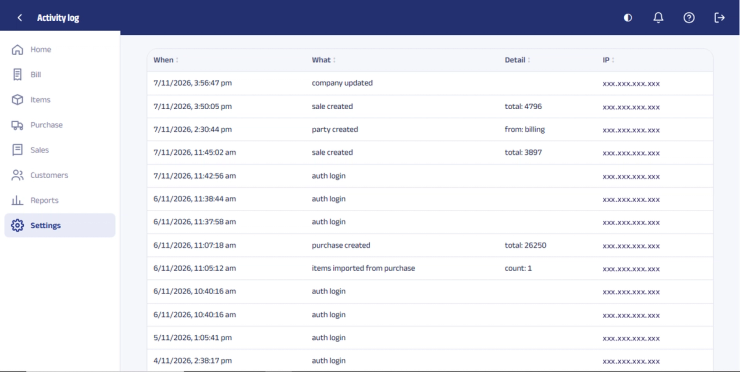
The Watch List helps highlight unusual activity and compares employees across selected checks. It can rank staff members based on flags and relative activity, giving the owner a starting point for reviewing transactions.
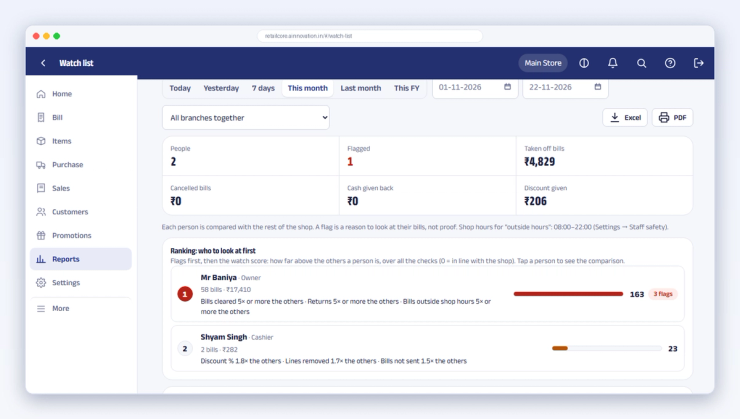
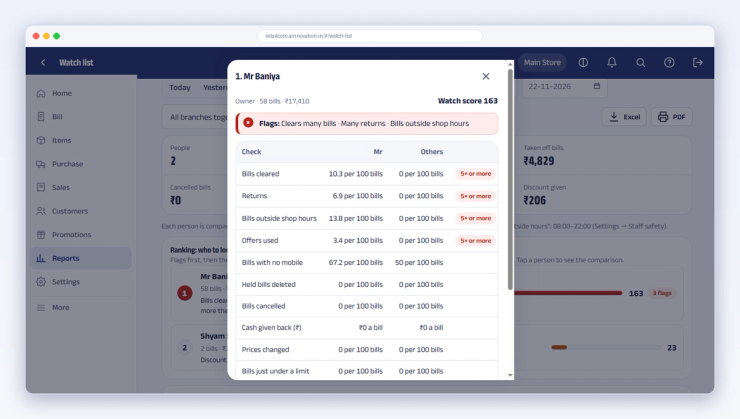
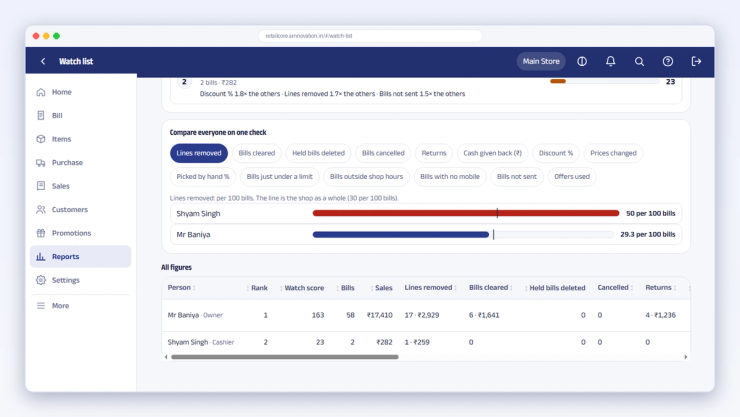
Examples of staff activity that may require review
Frequent bill clearing: If one salesperson clears bills substantially more often than others, the owner can review the activity to determine whether it is related to billing mistakes, customer changes or something requiring further investigation.
Unusually high returns: If one employee processes considerably more returns than the rest of the staff, the retailer can check the transactions, return reasons and supporting details.
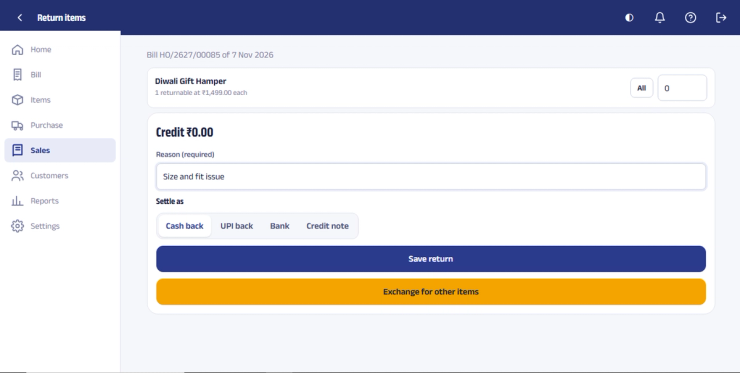
Unusual discount activity: The owner can compare discounts given by different employees and restrict discount permissions according to staff roles or limits.
Items removed from bills: Frequent product removals during billing may warrant review to understand the reasons and ensure transactions are handled appropriately.
Billing outside shop hours: Transactions outside the configured working hours can be highlighted for review.
Additional staff controls
- Staff roles and permissions.
- Discount restrictions and approval controls where configured.
- Staff activity logs.
- Login and access management.
- Staff account suspension or deactivation.
- Cash tally and transaction review.
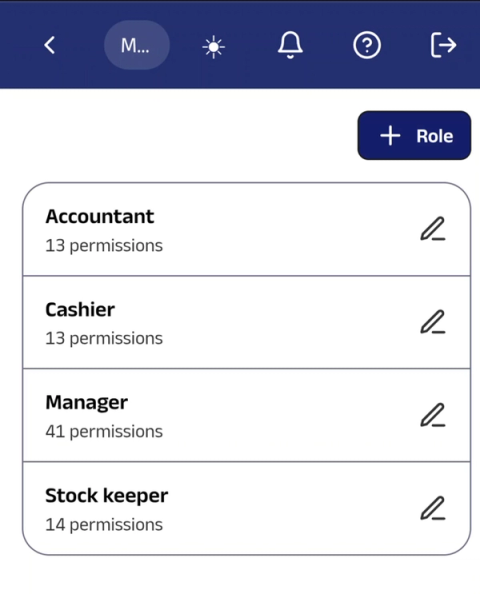
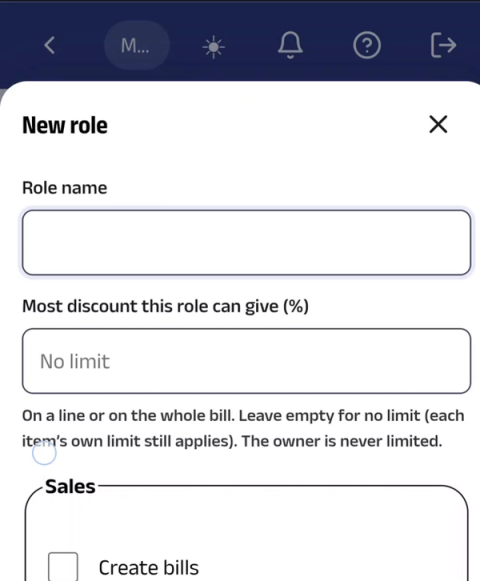
For an imitation jewellery retailer, these controls are especially useful when multiple employees handle the same stock, when the owner manages the store remotely, or when the shop has multiple counters or branches.
Software alone cannot eliminate theft. However, transaction accountability, stock verification, staff comparisons and timely investigation can help reduce blind spots and improve control over retail operations.
Learn more: RetailCore Staff Theft Control and Monitoring Software.
Want to see this with your own jewellery designs?
Send us a WhatsApp message. We'll show you barcode tags, billing, stock audit and staff controls using products like yours.

 Chat on WhatsApp
6. Customer Management and Purchase History
Customer relationships are important in imitation jewellery retail. Customers may return for weddings, festivals, gifting, parties, new collections or matching accessories.
However, retailers often lose opportunities because they do not maintain organised customer records or remember previous purchases and preferences.
RetailCore customer management helps retailers maintain customer details and purchase history, making it easier to understand buying behaviour and provide more relevant service.
Customer management capabilities
- Maintain customer information.
- Review previous purchases.
- Maintain birthday and anniversary information.
- Manage loyalty points.
- Plan customer follow-ups and reminders.
- Support customer communication and repeat purchases.
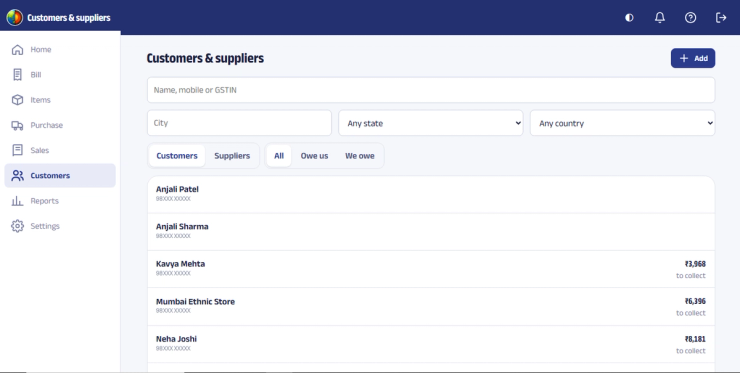
Imagine a customer who purchased a necklace set for a wedding. A few months later, the customer visits the shop looking for matching earrings or bangles. Previous purchase information can help staff understand the customer's preferences and offer more relevant suggestions.
Customer records can also help retailers organise occasion-based communication around birthdays, anniversaries, festivals and new collection launches, subject to customer consent.
Customer management is not simply about storing mobile numbers. It is about building a more organised approach to customer relationships and repeat business. For more ideas, read how customer service can become a growth engine for retail stores.
7. Promotions, Offers and Coupon Management
Retailers regularly run offers to attract new customers, encourage repeat purchases and increase sales during festive seasons, wedding periods and special occasions.
Managing discount schemes manually can create confusion among staff and make it difficult to track which promotions are being used.
RetailCore's Offers & Coupons module allows retailers to create promotional offers with coupon codes, discount values, validity dates and applicable stores.
Retailers can create campaigns for occasions such as Diwali, Navratri, wedding season, store anniversaries, new collection launches or special customer promotions.
Promotional campaign management
- Create custom offer names.
- Define coupon codes.
- Configure percentage discounts.
- Set offer validity periods.
- Specify participating stores.
- Monitor offer redemption and usage.
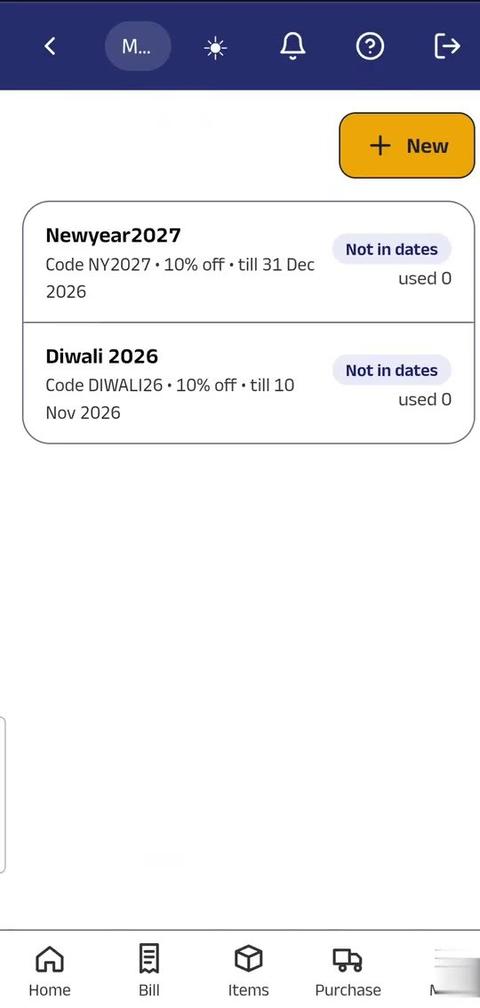
For example, an imitation jewellery retailer can launch a festive offer with a coupon code, define the discount, select the participating store and set the campaign's validity.
Staff can apply the promotional offer during billing, while the retailer can track how many times the offer has been used.
This makes promotions more structured and easier to manage than relying entirely on handwritten discount instructions or manually communicated schemes.
8. Gift Vouchers for Gifting and Customer Retention
Gift vouchers provide customers with an option to purchase a gift without selecting a specific jewellery design for the recipient.
They can be useful during festivals, birthdays, anniversaries, weddings and other gifting occasions.
RetailCore includes gift voucher management, helping retailers issue and track vouchers associated with customers.
Retailers can maintain voucher validity dates and track voucher status through categories such as Active, Used, Expired and Cancelled.
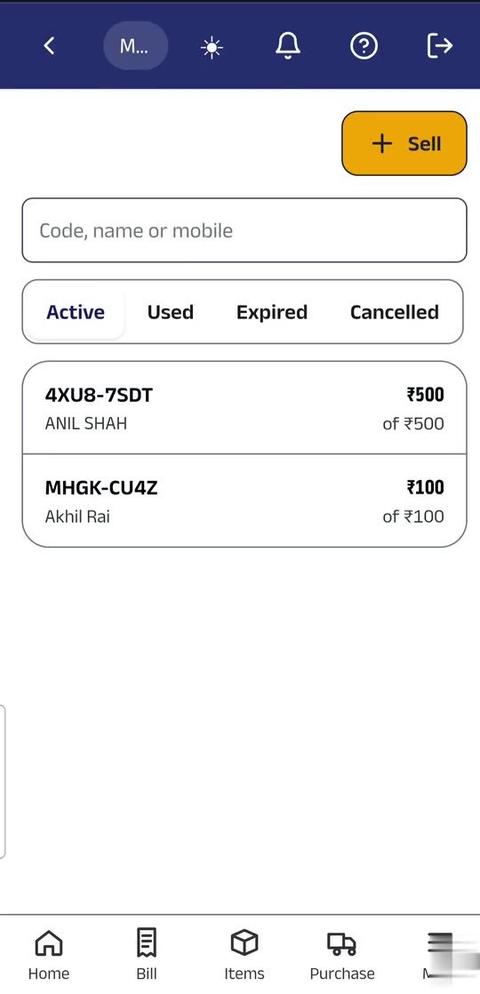
Voucher records can be searched using customer names, mobile numbers or voucher codes, making it easier to verify voucher information when customers return to redeem them.
Gift vouchers can also be used as part of promotional campaigns, customer loyalty activities and special occasion offers.
9. Birthday and Anniversary Promotions
A customer who purchased jewellery several months ago may not remember the store when looking for their next purchase. Timely communication can help retailers remain connected with customers.
RetailCore's Special Days feature supports birthday and anniversary wishes along with gift coupons.
Retailers can use these occasions to send personalised greetings and offer customers a reason to visit the store again.
For example, a birthday greeting combined with a gift coupon can create an opportunity for the customer to visit the shop, browse a new collection and make another purchase.
The aim is to make customer communication relevant rather than sending generic promotional messages to everyone.
10. Customer Feedback and Google Reviews
Customer experience plays an important role in the success of an imitation jewellery shop. Product quality, pricing, staff behaviour, service and the overall shopping experience influence whether customers return or recommend the store.
RetailCore includes a Feedback & Reviews module that helps retailers collect customer feedback and encourage customers to share their experience online.
After billing, customers can be directed to a feedback page through a QR code. Retailers can also share the feedback or review link with customers after billing.
The feedback workflow supports both private feedback to the retailer and redirection to the retailer's Google review page.
Feedback and review management
- Generate a QR code for customers to access the feedback page.
- Invite customers to share feedback after billing.
- Collect private customer feedback.
- Direct customers to the store's Google review page.
- Monitor customer ratings and feedback.
- Track feedback activity, link opens and review-site visits.
- Review feedback and mark it as handled.
- Analyse feedback activity over selected periods.
For an imitation jewellery retailer, feedback can reveal issues related to product quality, pricing, service, product availability, packaging or return experience.
Encouraging genuine customer reviews and responding constructively can help retailers strengthen their local online reputation and improve the experience they offer customers.
11. WhatsApp Integration for Customer Communication
WhatsApp has become an important communication channel for Indian retailers. Customers may prefer receiving their bills digitally, while retailers may use messaging for relevant alerts, notifications and promotional communication.
RetailCore supports WhatsApp integration for customer communication, including bill sharing, alerts and notifications.
Depending on the retailer's configured workflow and customer consent, WhatsApp can support:
- Sharing digital bills.
- Sending alerts and notifications.
- Customer communication.
- Relevant promotional campaigns.
- Occasion-based greetings and customer engagement.
Digital bill sharing also gives customers a convenient record of their purchases without having to retain printed bills.
Retailers should ensure that customers provide appropriate consent for promotional communication and that messaging follows applicable WhatsApp and privacy requirements.
12. Mobile Billing for Exhibitions, Trade Shows and Temporary Counters
Imitation jewellery retailers may participate in exhibitions, trade shows, festive markets, pop-up events, temporary stalls or promotional activities outside their regular store.
Setting up a full computer-based billing counter at every location may not always be practical.
RetailCore's cloud-based mobile billing capability allows retailers to use smartphones for billing. Staff can use a mobile phone to access the billing workflow and scan barcodes using the phone camera.
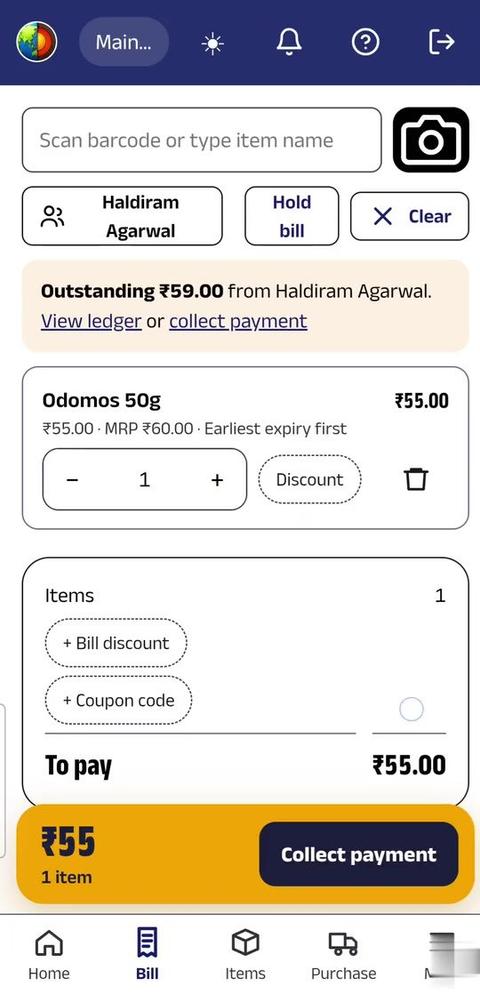
This can be useful when a retailer:
- Participates in a jewellery exhibition.
- Sets up a temporary sales counter.
- Runs a pop-up store.
- Creates an additional billing counter during busy periods.
- Conducts sales at a trade show or event.
- Needs a portable billing arrangement.
Imagine a retailer displaying 300 jewellery designs at a weekend exhibition. Instead of depending entirely on a computer-based billing counter, staff can use a compatible smartphone-based billing setup to scan products and generate bills.
Mobile billing provides flexibility when the retailer needs to sell outside the regular shop or operate a temporary counter. The cloud/mobile workflow requires an internet connection.
For retailers who already use barcode labels on products, mobile scanning can make event-based billing more convenient. See how billing on a mobile phone works.
13. Multiple Stores, Branches and Growing Retail Businesses
Many imitation jewellery retailers begin with a single shop and eventually expand to additional locations. Managing inventory, sales and business activity across stores becomes more difficult as the number of branches increases.
RetailCore offers multi-store retail management capabilities for businesses operating multiple locations.
Retailers can manage their business using a software setup suitable for their store structure and requirements.
Multi-store management is useful for:
- Retailers operating more than one jewellery shop.
- Businesses expanding into new cities.
- Family-run businesses with multiple outlets.
- Franchise-based retail operations.
- Owners who need visibility across branches.
As a business expands, a centralised retail management system can help reduce dependence on separate manual records maintained by individual stores.
RetailCore supports single-store and multi-store retail operations through its respective software configurations.
14. Cloud or Desktop POS: Which Is Better for Your Jewellery Shop?
Retailers should select a POS system according to their business requirements, connectivity, access needs and operating environment.
Cloud retail software
Cloud software is useful for retailers who want access to business information from different locations and devices. It can be particularly useful for owners who travel, manage multiple branches or need remote visibility into store operations.
RetailCore's cloud configuration supports internet-based access and mobile billing capabilities.
Desktop retail software
A desktop setup may be suitable for retailers who primarily operate from one location and prefer a locally operated billing environment.
RetailCore offers desktop and cloud configurations for different retail requirements. Retailers should choose the appropriate configuration based on their operating environment, connectivity and required features.
Cloud and desktop configurations should not be assumed to be interchangeable. Retailers should confirm the suitable edition and workflow before purchasing.
15. What Should You Check Before Buying POS Software for an Imitation Jewellery Shop?
Before selecting software, retailers should evaluate whether it can support their actual daily operations rather than choosing only on the basis of price or a feature list.
Important evaluation checklist
- Can the software manage thousands of products?
- Does it support bulk product upload?
- Can product attributes be customised?
- Can it generate barcodes and QR codes?
- Can barcode labels be designed and printed in different formats?
- Does it support compatible A4 sticker and thermal label printing?
- Can staff scan products during billing?
- Does it support returns and stock management?
- Can physical stock be audited using smartphones?
- Can multiple staff participate in stock counting?
- Can the software help identify stock differences?
- Does it support daily quick stock counting?
- Can staff discounts, returns and transaction activities be monitored?
- Are staff permissions and transaction controls available?
- Does it maintain customer purchase history?
- Can birthdays, anniversaries and loyalty points be managed?
- Can offers and coupons be configured?
- Can gift vouchers be tracked?
- Can customers provide feedback and access Google review links?
- Can bills and relevant customer messages be shared through WhatsApp?
- Can billing be performed using a smartphone when required?
- Can the software support additional branches as the business grows?
- Is training and technical support available?
A software demonstration should ideally be conducted using products and scenarios similar to the retailer's own business. Ask the vendor to demonstrate barcode generation, billing, returns, stock counting, stock audit, staff permissions and reports.
If you also sell garments or run a boutique alongside jewellery, see our guide to POS software for boutiques.
Why Consider RetailCore for an Imitation Jewellery Shop?
RetailCore is designed to support the practical requirements of Indian retail businesses. It combines billing, inventory management, barcode generation and printing, stock auditing, staff monitoring, customer management and promotional tools in a retail management system.
For imitation jewellery retailers, the value is not limited to generating bills. The software can support the broader business workflow—from adding thousands of products and printing labels to checking physical stock, monitoring staff activity, managing customers and running promotions.
RetailCore serves different retail categories and business sizes, including single-store retailers and multi-store businesses. See what RetailCore offers imitation jewellery shops.
RetailCore capabilities at a glance
| Business requirement | RetailCore capability |
|---|---|
| Product management | Large catalogues, bulk upload and customizable attributes |
| Product identification | Barcode and QR code generation and label printing |
| Physical stock audit | Smartphone-based barcode scanning and consolidated audit reports |
| Regular stock checking | Quick Count for checking selected products regularly |
| Staff control | Permissions, transaction monitoring, alerts and Watch List |
| Customer management | Customer records, purchase history, loyalty points and occasions |
| Promotional campaigns | Offers, coupons, vouchers and promotional management |
| Customer engagement | Special-day wishes, WhatsApp communication and follow-ups |
| Online reputation | Customer feedback and Google review workflow |
| Mobile operations | Smartphone-based billing and barcode scanning on supported cloud workflows |
| Business expansion | Multi-store retail management configuration |
The right software should make retail operations easier to manage as the business grows. RetailCore brings several essential retail functions together so shop owners can spend less time dealing with manual processes and more time focusing on products, customers, sales and business growth.
Looking for POS Software for Your Imitation Jewellery Shop?
If you are managing thousands of designs, facing inventory discrepancies, spending too much time on billing or finding it difficult to monitor store operations, see how billing, barcode management, stock audits, staff accountability, customer management and promotions can work together for your jewellery retail business.
Frequently Asked Questions
Which is the best POS software for an imitation jewellery shop?
The best POS software should support fast billing, large product catalogues, barcode generation, inventory management, stock audits, staff monitoring, customer management and promotional campaigns. RetailCore combines these functions to support daily imitation jewellery retail operations.
Can POS software manage thousands of imitation jewellery designs?
Yes. RetailCore can handle thousands of items and supports bulk product upload, product management, customizable attributes and reports. This helps retailers manage large collections without entering products individually.
Can I create different product attributes for imitation jewellery?
RetailCore supports customizable product attributes. Retailers can organise products according to the details relevant to their business, such as design, colour, material, size, collection, supplier or other custom information.
Does imitation jewellery billing software support barcode printing?
RetailCore supports barcode and QR code generation, label design and printing. Retailers can use compatible A4 sticker sheets with laser printers or suitable roll labels with thermal label printers.
Can I conduct a physical stock audit using a mobile phone?
Yes. RetailCore's AuditCore stock audit workflow allows staff to use smartphones to scan barcodes while physically counting products. The collected data is consolidated by the audit engine to help identify stock differences.
Can multiple employees participate in stock auditing?
The stock audit workflow supports counting activities involving multiple staff members, helping retailers divide stock-counting work and consolidate the collected results.
What is Quick Count in RetailCore?
Quick Count is a regular stock-checking approach that allows retailers to count selected items periodically instead of conducting a complete physical stock audit each time. It helps retailers monitor inventory differences and investigate discrepancies sooner.
Can RetailCore help control staff activities?
RetailCore provides staff permissions, transaction monitoring, alerts and a Watch List that compares employee activity. It can highlight unusual patterns such as bill clearing, returns, discounts, items removed from bills, price changes and billing outside configured shop hours.
Can I monitor discounts given by sales staff?
RetailCore supports discount-related controls and monitoring. Retailers can review staff discount activity and configure permissions or restrictions according to their business requirements.
Does RetailCore maintain customer purchase history?
Yes. RetailCore maintains customer records and purchase history, helping retailers understand previous purchases and provide more relevant customer service.
Can I manage customer birthdays and anniversaries?
RetailCore supports customer occasion information and Special Days features for birthday and anniversary wishes, including gift coupon-related engagement.
Does RetailCore support loyalty points?
RetailCore supports customer loyalty points, helping retailers organise customer rewards and encourage repeat purchases.
Can I create promotional offers and coupon codes?
Yes. RetailCore supports offers and coupons with configurable coupon codes, discounts, validity periods and applicable stores, along with offer-usage tracking.
Does RetailCore support gift vouchers?
Yes. RetailCore supports gift voucher management, including customer association, validity dates and voucher status tracking such as active, used, expired and cancelled.
Can customers provide feedback and Google reviews?
RetailCore supports a feedback workflow where customers can access a feedback page through a QR code or shared link. Customers can submit private feedback or be directed to the retailer's Google review page.
Can I send bills to customers through WhatsApp?
RetailCore supports WhatsApp integration for customer communication, including sharing bills and sending alerts or notifications, depending on the configured workflow.
Can I use RetailCore for billing at exhibitions?
RetailCore's cloud-based mobile billing capability allows retailers to use smartphones for billing and barcode scanning. This can be useful at exhibitions, trade shows, temporary stalls and pop-up sales counters. An internet connection is required for the cloud/mobile workflow.
Does RetailCore support multiple jewellery stores?
RetailCore offers a multi-store retail management configuration for businesses operating multiple stores or planning to expand. The appropriate configuration depends on the retailer's business requirements.
Should I choose cloud POS or desktop billing software?
The choice depends on whether you need remote access, mobile billing, multiple stores, internet connectivity and your preferred operating environment. RetailCore offers cloud and desktop configurations for different retail requirements. Discuss the appropriate configuration before selecting the software.
How do I know whether RetailCore is suitable for my jewellery business?
The best way is to see a demonstration using your actual business requirements. Ask the team to show product upload, barcode generation, billing, stock audit, Quick Count, staff monitoring, customer management and promotions. This helps you evaluate the software against your daily workflow before making a decision.

Jignesh Koladiya
Retail Operations Consultant
I study the problems retailers face every day. Our team designs, builds and supports RetailCore around them, using their feedback, for retail and wholesale businesses across India and beyond. I have worked at RetailCore since 2012, which serves more than 4,000 retailers.